

Month: June 2026

Ask a lab owner why they are still running software they have clearly outgrown, and the answer is rarely “it works great.” It is usually some version of this: switching feels like a gamble I cannot afford to lose.

That fear is reasonable. A lab runs on its data and its routines. The idea of moving years of doctor accounts, pricing, and case history into a new system, then retraining everyone, is enough to make staying put feel like the safe choice.

But staying on the wrong system has a cost too. It is just quieter. It shows up as workarounds, spreadsheets bolted onto software that cannot do the job, and a ceiling on how much the lab can grow before the tools give out. The risk of switching is loud and obvious. The risk of not switching is slow and easy to ignore.

So the real question is not “should I switch.” It is “how do I switch without the horror story.” Those stories are real, but they almost always trace back to a few avoidable causes.

What actually goes wrong

The data migration is treated as an afterthought. When accounts, pricing, and history are dumped in without a mapping plan, the new system launches full of errors that erode trust on day one. A good migration starts with a deliberate mapping phase, weeks before go-live, so the data lands clean.

Go-live lands on a bad date. Switching in the middle of a heavy production run, or right before month-end, guarantees pain. The fix is simple: pick the date around the lab’s natural rhythm, not the vendor’s calendar.

Training is a video and a hope. Self-serve onboarding works for simple tools. A lab management system touches technicians, managers, AR, order entry, and sales, and each group needs to be shown their part. When training is left to a quickstart link, the system gets blamed for what is really a rollout gap.

Nobody owns the first month-end. Month-end is where a lab either trusts the new system or starts quietly reverting to the old way. Getting through that first close with help is what makes the switch stick.

What a good migration looks like

The pattern is consistent across labs that switch without drama. There is a real implementation plan, not a download. There is a dedicated person who knows the software and walks the lab through setup, configuration, integrations, and training across each role. And that person stays through the first month-end, so the lab is never standing on the new system alone at the moment that matters most.

That is the difference between “here are some docs, good luck” and “we will get you live and we will be there when you close the month.” The first is where horror stories come from. The second is how a switch becomes a non-event.

The honest framing

No migration is zero effort. Anyone who promises that is selling. But the effort is front-loaded and finite, and on the other side is a system that fits the lab you have actually become, instead of the one you were when you first signed up.

The labs that put off the decision for years almost always say the same thing afterward: the switch was smaller than the fear of the switch. The dread did more damage than the move ever did.

If your lab has outgrown its software but the migration is what keeps you stuck, that is worth a conversation. Not a sales pitch, a straight walkthrough of what moving would actually involve for a lab your size, so the decision is based on the real picture instead of the worst-case one.
Most labs do not wake up one day and decide to replace their management software. The realization builds slowly. A workaround here, an export there, one more monthly fee for a feature that used to be simpler. By the time a lab starts shopping, the frustration has usually been quietly compounding for a year or more.

The hard part is telling the difference between normal growing pains and a system that has genuinely stopped keeping up. Here are five signs it is the software, not you.

1. Adding a user costs more than the user is worth

Per-seat subscription pricing feels reasonable when you have five people. At fifteen, it becomes a tax on growth. Every hire is another monthly line item, and the math quietly pushes you to under-license, share logins, or keep people off the system who should be on it. Good lab software should make it easier to grow your team, not more expensive every time you do.

2. Your second location is bolted on, not built in

Plenty of systems can technically handle more than one site. Far fewer were designed for it. The tell is in the daily friction: separate databases you reconcile by hand, reports that cannot combine locations, pricing and AR that do not stay straight across sites. A platform built for multi-location runs every site on one database, shares what should be shared like products and scheduling, and keeps separate what should be separate like price lists and receivables.

3. You cannot see productivity without exporting it

If the only way to know how your technicians are performing is to pull a report after everyone has gone home, you are always managing yesterday. Capacity, efficiency, and case flow should be visible while the day is still happening, in time to actually do something about a bottleneck. When a lab grows past the point where the manager can see the whole floor at a glance, the software has to fill that gap, not widen it.

4. Your CRM only knows what your staff typed in

Most lab CRMs are really just a log of what your team remembered to enter. That leaves out everything your field reps see in the office and everything your doctors do directly. The strongest customer records are fed from all three directions at once: lab staff, field reps, and the doctors themselves, all writing to one shared account history automatically. If your system only captures one of those three, you are seeing a third of the relationship.

5. Your data is not really yours

This is the one labs notice last and regret most. Ask a simple question: if you decided to leave your current software next month, could you take your data with you, cleanly and completely? If the honest answer is “I am not sure,” you do not own your data so much as rent access to it. Owning your database, on your own server and backup drives, is the difference between a vendor relationship and a vendor dependency.

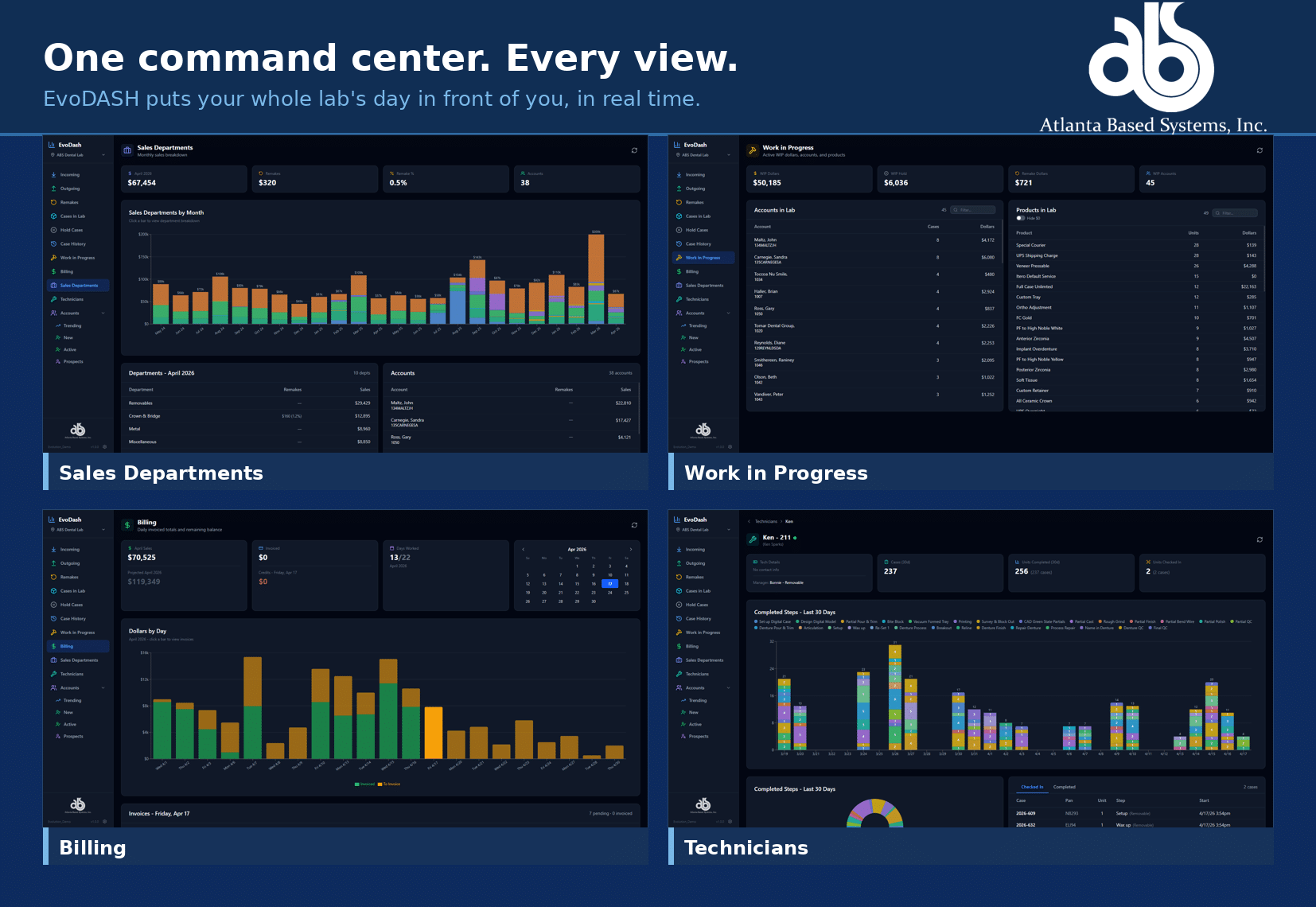
EvoDASH executive command center for Evolution, showing real-time sales, work in progress, billing, and technician views for a dental lab

What to do if more than one of these sounds familiar

Recognizing the signs is the easy part. The reason most labs stay on software they have outgrown is not loyalty. It is the fear of switching. Migrating years of cases, accounts, and pricing feels like open-heart surgery on a business that cannot afford downtime.

It does not have to be. The switch is exactly where a software partner earns its keep. At Atlanta Based Systems we assign every new lab a dedicated implementation specialist who handles the migration, trains your team across every role, and stays with you through your first month-end close. We have spent nearly 50 years building Evolution for dental laboratories, and roughly 200 labs across North America run on it today. A good number of them came to us because they had outgrown something else.

If two or three of these signs hit a little close to home, that is worth a conversation. We are glad to show you what your lab looks like on software built to grow with it, no pressure and no obligation.

Book a 15-Minute Intro

Recent Posts
Archives