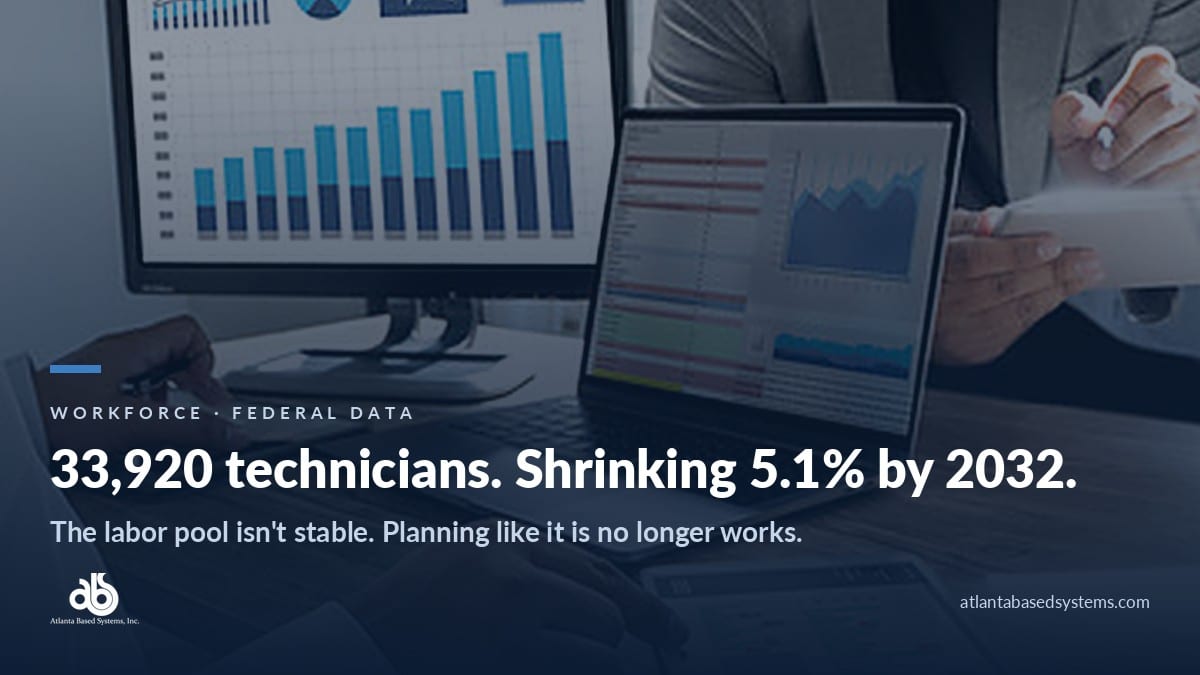
There are 33,920 dental laboratory technicians working in the US right now. According to federal labor projections, that number is expected to shrink by 5.1% over the next several years, even as the overall job market keeps growing. Roughly 150 openings a year get created nationally, and almost all of them come from people leaving the field, not from new positions being added.
That’s worth sitting with for a second, because it changes the question labs should be asking. This isn’t “how do we hire our way out of a tight quarter.” It’s a structural, multi-year contraction in the number of people who can do this work at all.
Why “just hire more” stops working
Most labs still plan staffing the way they always have: when volume goes up, post a job, wait for applicants, train them in. That approach assumes the labor pool is roughly stable and just needs the right recruiting push.
The federal data says that assumption is wrong. The pool itself is getting smaller. A lab competing for a shrinking group of qualified technicians against every other lab in the region isn’t solving a hiring problem with a better ad. It’s competing for a resource that federal projections say keeps declining through the early 2030s.
What actually moves the needle instead
If you can’t reliably add technicians, the only lever left is getting more out of the ones you already have, and that starts with actually knowing what they’re producing.
Most labs can tell you total case volume for the month. Far fewer can tell you, in the moment, what any individual technician has finished today, where a specific case is sitting right now, or which step in the workflow is quietly eating the most time. Without that visibility, “we need more people” becomes the default answer to every capacity problem, even when the real issue is a bottleneck two steps upstream that’s invisible without real-time data.
Labs that track technician output and case status in real time aren’t immune to the shortage. But they’re not flying blind through it either. They can see where a backlog is actually forming, decide whether it’s a staffing problem or a workflow problem, and make that call with data instead of a hunch.
See what’s coming for your lab
The technician shortage isn’t a headline that will pass. It’s a demographic trend with a multi-year runway, and it’s already shaping which labs can take on more cases and which ones are stuck turning work away. The labs that come out ahead won’t be the ones who found more technicians. They’ll be the ones who knew, day to day, exactly where their existing team’s time was going.
If you’ve been running on gut instinct about what your technicians are producing, we’d be glad to walk through what a real setup looks like for a lab your size. Contact us
There is a call every dental lab in America takes several times a day. An office rings in and asks where a case is. Someone at your lab puts them on hold, walks to the bench or opens a screen, finds the case, walks back, and reports. The call takes four minutes on your end. It took four on theirs too.
Nobody logs it. Nobody costs it. It does not show up on any report you run at month end. And it is, on a per-minute basis, one of the most expensive things happening in your building, because both sides of that call are paying for information that already existed.
Two findings from the ADA’s Health Policy Institute make the case better than any lab software vendor can.
What is actually happening in your customers’ offices
The Health Policy Institute’s Q2 2026 update on the dental economy does not bury its finding. It titles the chart “Dentists are Busier in Q2 2026.” Chairs are fuller than they were the quarter before.
That reads like good news for everyone, and for the lab it partly is. More production. But look at what the same research says about who is in the building to handle it. Dental hygienists are the hardest role in a practice to recruit, in the Q2 update and the Q1 one before it. As of the Q1 read, only around three out of five dentists said they had an adequate number of them.
Hold those side by side. The practices your lab serves are running fuller schedules with a team they cannot easily add to. Every person in that office is absorbing more than they were six months ago.
The scarcest resource in a dental office right now is not chair time. It is anybody’s spare attention.
That is the person calling your lab about a case.
The math nobody runs
Say a mid-sized lab takes twenty of these calls a day. That is a conservative figure for a lab with a healthy account base, and larger labs will recognize it as low.
Twenty calls at four minutes is eighty minutes a day on your side. Call it seven hours a week, a third of a full-time position, spent transmitting information rather than producing anything. Then double it, because the same eighty minutes was spent inside practices that are running fuller schedules with a team they cannot easily add to.
The cost that matters is not the wage. It is what the call signals. A practice that has to call you to find out where a case is has learned that working with your lab requires labor. They may never say that out loud. They will not file a complaint about it. But when a competitor’s rep walks in and says their offices can see case status themselves, that practice already knows exactly what problem is being solved.
What actually removes the call
Labs tend to reach for the wrong fix here. A better phone system does not remove the call. A dedicated customer service seat does not remove the call, it just staffs it. Even a portal does not remove the call by itself, if the portal shows a status somebody has to remember to update.
What removes the call is a case status that is current because the production system is current. When a case moves through the lab, its state changes on its own, and the office can see it: accepted, scheduled, in process, complete, or on hold. No login queue, no callback, no waiting for someone at the lab to be free. Available at eleven at night, when the question actually occurs to the person who has to plan tomorrow’s schedule.
That is what a doctor portal is for. In Evolution, that portal is EvoDOCTOR, and it does one thing beyond call deflection that is worth understanding.
Every action a doctor takes in the portal, submitting a case, adding a note or an image, requesting a pickup, is recorded automatically as a CRM activity against that account. No one at your lab types it. The result is an account history that reflects what the doctor actually did rather than what a staff member remembered to write down. Six months later, when an account goes quiet and somebody asks what changed, the record is there.
For labs that want it under their own name, EvoDOCTOR can be published as the lab’s own branded app on iOS and Android.
The question to take into next week
Do not start with software. Start with a count.
For one week, have whoever answers the phone put a tally mark on a sheet of paper every time a call is only about where a case is. No categories, no system, just the mark. At the end of the week you will have a number you have never had before.
Whatever that number turns out to be, it is the size of a problem you are currently paying for twice: once in your own labor, and once in the patience of front desk staff at practices that do not have any to spare.
Ask a lab owner what would break if they took two weeks off, and most of them laugh before they answer. The laugh is the answer. Every lab we talk to runs on a layer of knowledge that no dental lab management software was ever given, because nobody ever wrote it down.
The knowledge that never made it into the system
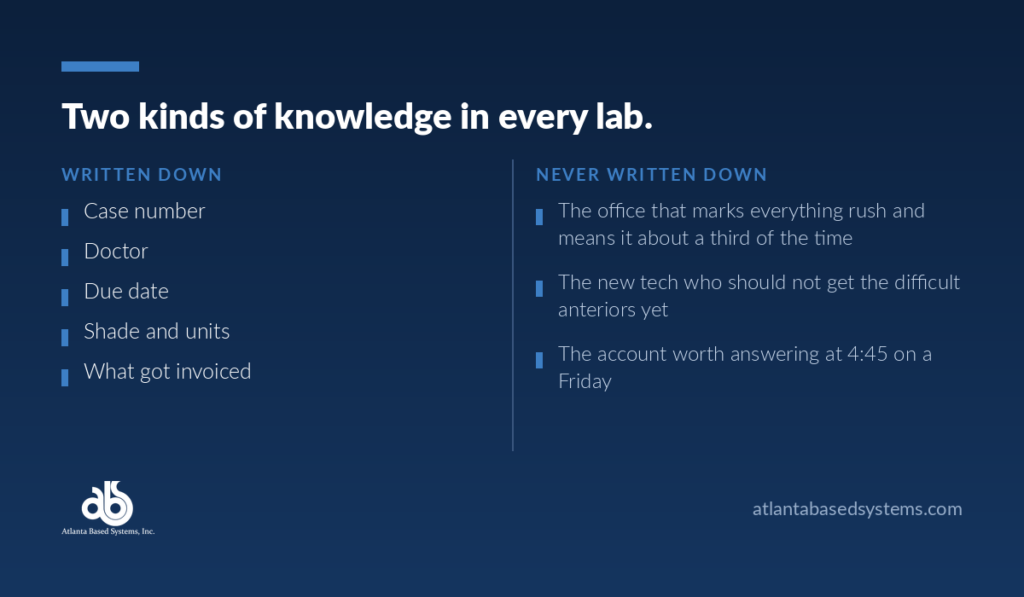
Your system knows the case number, the doctor, the due date, the shade, and the units. It knows what got invoiced.
It does not know that one of your offices marks everything rush and means it about a third of the time. It does not know that the crown and bridge tech who joined in March should not get the difficult anteriors yet. It does not know that when a certain account calls at 4:45 on a Friday, the right move is to answer, because that account has never once been unreasonable and has never once been late paying.
That knowledge is real, it is valuable, and in most labs it lives in one or two heads. Usually the owner’s. Sometimes it belongs to a twenty year technician, or the one administrator who has been there long enough to remember three phone systems.
What actually breaks when that person is out
It is rarely production. Cases still get made. Technicians are good at their work and they keep doing it.
What breaks is everything around the case. Routing decisions get made by whoever is nearest instead of by whoever knows. Doctor preferences get missed, which turns into an adjustment, which turns into a remake nobody counted on. Exceptions pile up: the account with the custom pricing, the case that is supposed to ship direct, the doctor who never gets charged for the second try-in. Somebody has to guess, and guesses are expensive.
And the calls. When the person who knows everything is not there, the phone becomes the backup system. Technicians get interrupted to answer questions that are not technical questions. A lab that was quietly efficient on Monday feels chaotic on Thursday, and nothing about the work itself changed.
Why being good at it makes it worse
Here is the part that is hard to hear. The better that one person is, the less the lab ever needed to write anything down.
A lab with an owner who remembers everything has no forcing function to document anything. Every year that owner gets better and faster, and every year the gap between what the lab knows and what the lab has recorded gets wider. Competence hides the risk instead of removing it. It is the same reason the best technician on your bench is often the one with no written notes on their own process.
This matters more now than it did ten years ago. Owners are getting closer to retirement, buyers are asking harder questions during diligence, and a lab whose operating knowledge cannot be transferred is a lab that is worth less at the moment of sale than the owner thinks it is.
What dental lab management software can and cannot carry
Software is very good at holding structured knowledge and putting it in front of whoever needs it. Doctor preferences attached to the account rather than to a person’s memory. Pricing exceptions that apply themselves instead of being remembered. Case status that anyone can look up without interrupting a technician. Remake history that shows a pattern rather than a feeling.
Software is not good at deciding what your policy is. It will not tell you which technician should get which case, or which accounts are worth accommodating. Those are judgment calls, and they stay yours.
That distinction is the useful one. The goal is not to replace what the owner knows. It is to move the parts that are rules into the system, so the parts that are judgment are the only things anyone has to interrupt you for.
What this means for your lab
Do not start with a documentation project. They die in week two, every time.
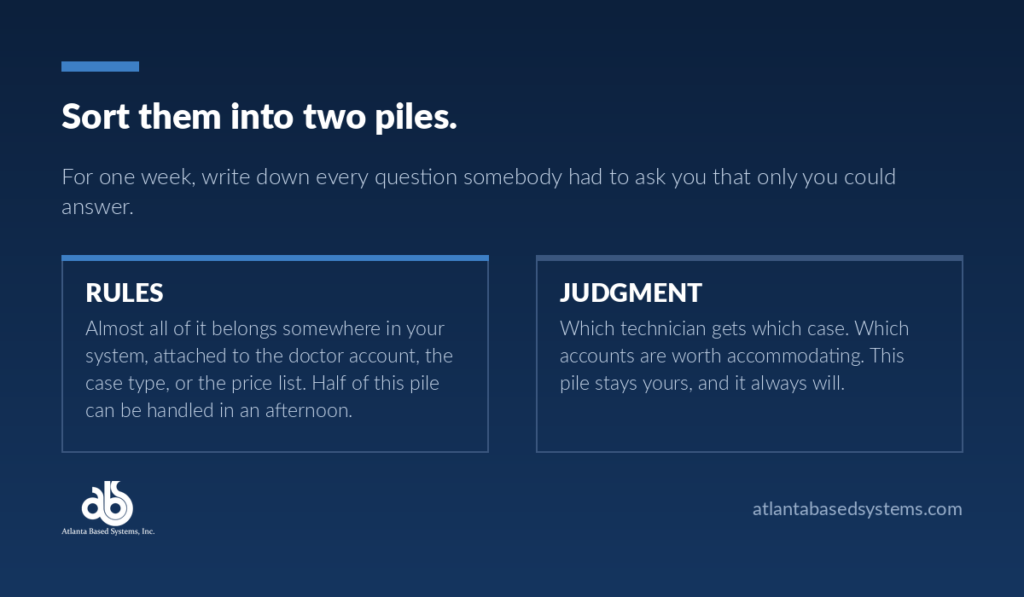
Start with one exercise. For one week, write down every question somebody had to ask you that only you could answer. Not the decisions. The questions. At the end of the week, look at the list and sort it into two piles: things that are actually a rule, and things that are actually a judgment call.
The rules pile is the work. Almost all of it belongs somewhere in your system, attached to the doctor account, the case type, or the price list. Most labs find that pile is longer than they expected and that half of it can be handled in an afternoon.
Then do the same exercise in six months. If the list is shorter, the lab is less dependent on you than it was, which is the only real measure of whether any of this worked.
See what this looks like in your lab
If this sounds familiar, we would be glad to walk through what a setup looks like for a lab your size, including where the knowledge in your head could reasonably live instead. No commitment required. Contact us and we will find a time.
The National Association of Dental Laboratories built a two-day certificate program this year, and the reason they gave for it is the most useful sentence in the industry right now: the need for qualified managers has been identified as one of the top issues currently impacting the dental laboratory industry.
Not equipment. Not offshore pricing. Managers.
HOW MOST LAB MANAGERS GET THE JOB
The path is nearly universal. Someone is the strongest technician in the department. They are fast, their remakes are low, and other techs already ask them questions. A department opens up, and promoting them is the obvious call.
Then the job changes underneath them. The skill that earned the promotion, doing excellent work with their hands, is not the skill the new role needs. The new role needs capacity planning, exception handling, and the willingness to interrupt someone else’s work. Most new managers get none of that in writing. They get a title and a department.
What follows is predictable. They keep doing bench work, because bench work is what they are good at and what feels productive. The management half happens in gaps. Cases go late for reasons nobody catches until a doctor calls, and the lab absorbs the cost of a manager who is now neither a full technician nor a full manager.
THE FIRST NINETY DAYS ARE A VISIBILITY PROBLEM
Ask a new production manager three questions on a Tuesday afternoon and you will learn where the real gap is.
Which cases in your department are late right now. Which technician is behind. What is on hold, and why.
At most labs, those answers live in three places: a list printed this morning, someone’s memory, and a walk to the back of the building. A manager with fifteen years in the department can run on that. They know which doctor calls at 4:00 and which tech gets quiet when they are underwater. That is pattern recognition built over a decade, and it is not transferable.
A manager in month three has none of it. Every question costs a lap around the floor, and the laps are why they are not managing.
WHAT TO GIVE THEM INSTEAD
Three things close most of the gap, and none of them require a new hire.
Set the teams up properly first. In Evolution, production manager tools depend on technicians being linked to their managers in the Managers form under the Maintenance menu. Labs skip this, then conclude the tools do not work. They work. They just have nothing to filter on until the teams exist. Do this before anything else.
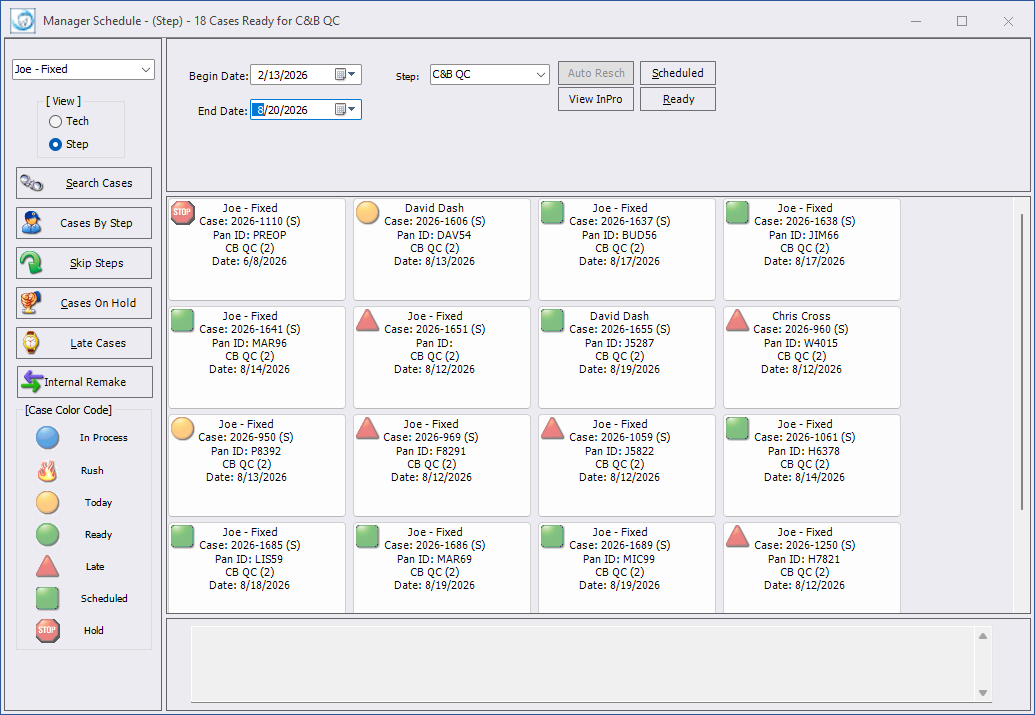
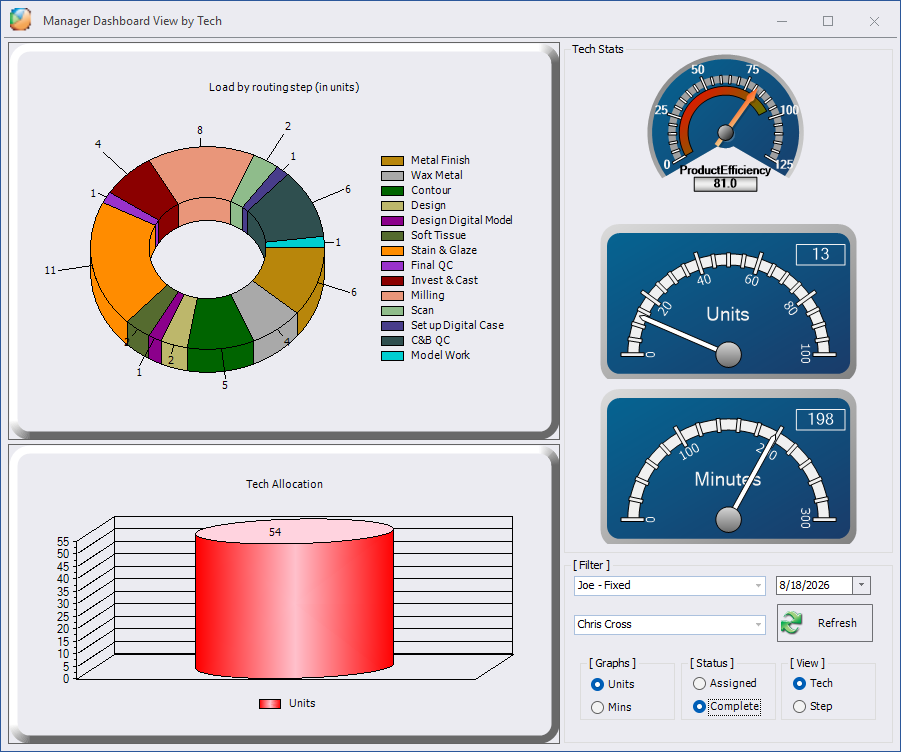
Give them the manager view, not the lab view. A lab-wide late case list is not a management tool for a department head, it is noise with their cases buried in it. What a production manager needs is their own bench, filtered to their own technicians, current as of now. Evolution’s manager schedule and manager dashboard do that filtering, which is the whole reason the team setup matters.
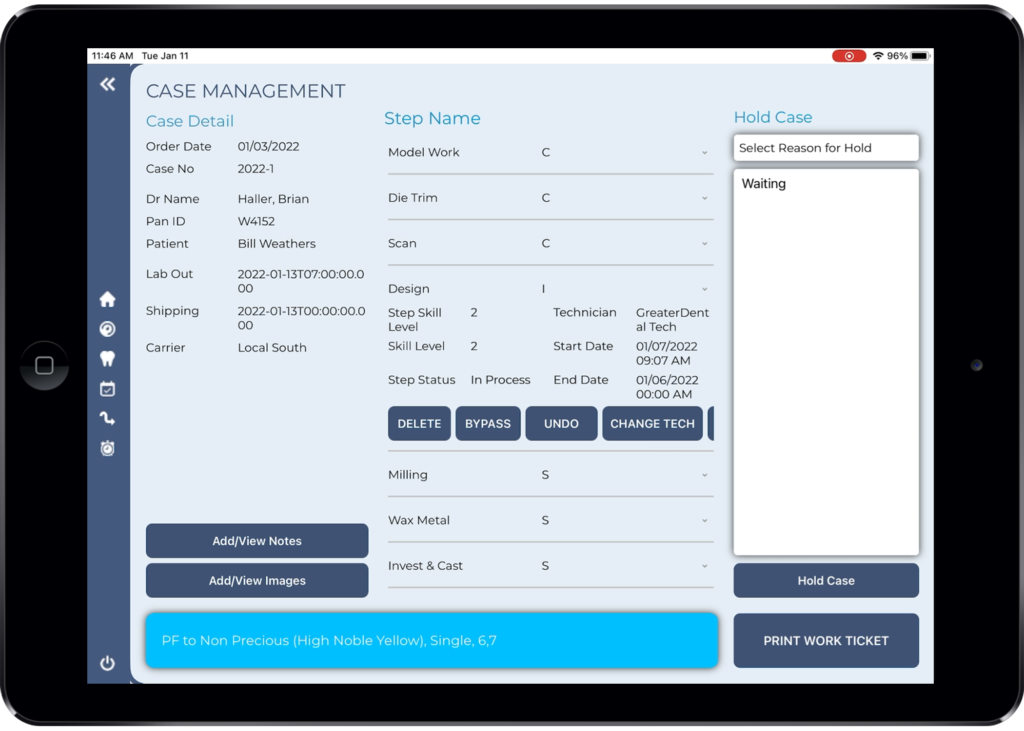
Let them fix things from where they are standing. Most of a manager’s day is exception handling: reassign this case, put that one on hold, bypass a step, print an updated work ticket. If every one of those requires walking back to a desk, they will batch them, and batching exception handling is how cases go late quietly. The EvoMGR tablet app exists to move those actions to the bench.
WHAT VISIBILTY DOES NOT FIX
Software will not make someone a good manager. It does not teach them how to tell a technician their work is slipping, or how to decide which of two late cases gets the last hour of the day. Those are judgment calls, and judgment comes from doing the job with feedback.
What visibility does is shorten the feedback loop. A manager who can see that a case sat idle for nine hours learns something on Tuesday instead of finding out at the end of the month. That is the difference between two years of learning and six months of it.
It also makes the training conversation possible. You cannot coach someone on a decision you cannot see them make. Once the department’s data is visible to both of you, a weekly fifteen-minute review of what went late and why becomes the apprenticeship the industry never built.
WHAT THIS MEANS FOR YOUR LAB
If you promoted a technician into a management role in the last two years, assume they are carrying this gap and assume they will not raise it. People who were promoted for competence rarely volunteer that they feel incompetent.
Start with three concrete steps. Confirm the manager teams are actually set up in your system, because half of labs find out they never were. Sit with the new manager and watch them answer the three questions above, timing how long each takes. Then hand them the tools that shorten the answer.
NADL is running its management certificate program in Tempe on September 17 and 18. If you have a new manager, that is two days well spent.
SEE WHAT THIS LOOKS LIKE IN YOUR LAB
If you are on Evolution and are not sure whether your manager teams are configured, we will walk through it with you. No commitment, and it usually takes under half an hour. Contact your favorite ABS Support technician.
Eight dental lab deals have been announced so far in 2026, one short of the pace set in 2021. That number is getting read as a signal to sell. We think it is a better signal about what makes a lab durable.
What changed in this wave
The last big consolidation cycle ran on a scale thesis. Buy labs, centralize production, pull cost out of the middle, and let the volume do the work. It worked in some cases and produced a lot of unhappy technicians in others.
The 2026 deals look different. The recapitalization of Apex Dental Laboratory Group by LongueVue Capital and Swaney Group Capital in March, and Catalis Dental Lab Partners picking up Revolution Dental Lab, JB Dental Lab and Avaneer Dental Studio, share a common characteristic. The coverage describes buyers underwriting domestic manufacturing capacity and digital capability, and treating both as competitive moats rather than overhead.
That is a real shift. Domestic production went from being the expensive option to being the defensible one, and the tariff environment did most of the work in getting it there.
The part that has nothing to do with selling
Here is why this matters to a lab that will never take a call from a banker.
If buyers are paying a premium for domestic capacity, digital workflow and provable operating performance, those three things are not deal characteristics. They are competitive characteristics. The lab down the road is not going to beat you because it got bought. It is going to beat you if it can quote faster, turn cases faster, and show a doctor a remake rate.
The first two are equipment and process decisions. The third one is where most independent labs quietly lose ground, and it is the cheapest of the three to fix.
The numbers a buyer asks for, and why you need them anyway
Due diligence on a lab is not exotic. It comes down to a handful of questions.
What is the remake rate, and does it break out by technician, by account, and by product? What does AR aging look like past 30, 60 and 90 days? What is unit throughput per technician? Which accounts are growing, and which have quietly shrunk 20% over eighteen months?
Most lab owners have a feel for all of these. Very few can produce the actual figures without a week of spreadsheet archaeology, and the figures that come out of that week describe a lab that no longer exists.
That gap is expensive long before anyone is buying anything. A remake rate that drifts from 4% to 7% costs real money for months before it shows up in a P&L. An account that slides from net 30 to net 75 does the same thing to cash. A technician whose throughput dropped after a workflow change is a problem you want to catch in three weeks, not at year end.
None of that requires a transaction to be worth knowing.
What a good version of this looks like
The labs that handle this well are not running more reports. They are running fewer, and looking at them more often.
A weekly glance at remake rate by account catches quality drift while it is still a conversation and not a lost customer. A daily look at what has been finished but not yet invoiced turns billing from a month-end scramble into a Tuesday task. Technician throughput compared week over week tells you whether the new mill actually did what the salesperson said it would.
This is the reason we built EvoDASH into the Evolution suite. Not because dashboards are interesting, but because the interval between when a number goes wrong and when a lab owner finds out is where margin disappears. Shortening that interval is most of the job.
What this means for your lab
You do not need to have an opinion about private equity to take something from this cycle. Take the checklist instead.
Pick the three numbers that would most change a decision you are making this quarter. For most labs that is remake rate, units per tech, and how much finished work is still waiting to be billed. Find out what they are this month, not last year. Then look at them again in thirty days.
If that exercise takes you a week, that is the finding. It should take a minute.
See what this looks like in practice
If you have been on Evolution a while and feel like you are not using everything you have, we do free walkthroughs. If you are evaluating a change, we are glad to show you what real-time lab visibility looks like on your own data. Either way, reach out.
The dental lab workforce has declined by more than 30% since 2004. Restorative demand has not.
The numbers don’t describe a hiring problem
The Bureau of Labor Statistics projects employment for dental and ophthalmic laboratory technicians to decline another 1% through 2034. Over the same period it projects roughly 7,700 openings a year, almost all of them from retirements and people leaving the trade rather than from growth.
Read those together and you get an uncomfortable picture. The industry isn’t contracting because there’s less work. It’s contracting because the bench is aging out faster than it’s being replaced, and the training pipeline was never rebuilt to match.
Meanwhile the number of US dental labs keeps falling. Roughly 4,375 businesses remain, down about 1.6% annually over the last five years, in a market worth around $7.6 billion. Fewer labs. Fewer technicians. Steady demand.
Why the standard playbook is failing
Most labs are running the same response: post the opening, wait, raise the offer, wait longer, and eventually hire someone who needs six months before they’re carrying a full load.
That approach competes for a pool that shrinks every year. You can win it occasionally. You can’t win it structurally, and the labs that keep trying end up paying more for the same output while their competitors quietly get better at something else.
There’s a second cost that’s easier to miss. Every month spent waiting on a hire is a month of turnaround times you can’t commit to, accounts you can’t take on, and overtime that erodes the margin you were protecting.
The lever that’s actually available
The labs pulling ahead have mostly stopped trying to hire their way out. They’ve shifted attention to the space between the case arriving and the case shipping, the only part of this equation they fully control.
That means knowing where technician hours actually go. Not payroll hours. Production hours, by case and by step.
It’s a harder question than it sounds. Most labs know their monthly unit count and their labor cost. Far fewer can say, without building a spreadsheet first, how many hours a case consumed by department, which step is holding up WIP right now, or whose remake rate has been climbing for three months.
That’s rarely a matter of not caring. The data usually already exists somewhere in the lab’s system. What’s missing is a screen that puts it in front of someone who can act on it today rather than at month end.
Where the recovered capacity actually comes from
When labs start measuring this, the gains rarely come from technicians working faster. They come from removing the things that were never production in the first place:
Rework. A remake rate that’s tracked weekly gets addressed while the cause is still identifiable. One tracked quarterly gets absorbed as a cost of doing business.
Case hunting. Time spent locating a case, chasing a missing Rx detail, or asking who has the model is invisible on a timesheet and expensive in aggregate.
Bottlenecks nobody named. Most labs have one step that quietly sets the pace for everything downstream. It’s usually obvious once it’s measured and invisible until then.
None of that requires a hire. All of it requires visibility.
What this means for your lab
Before you write another job posting, answer one question honestly: how many hours per technician per week go to production, and where does the rest of the day go?
If you can’t answer it from your existing system in a few minutes, that’s the first thing to fix. Not because measurement solves the shortage; it doesn’t. But because you can’t recover capacity you can’t see, and recovered capacity is cheaper, faster, and more certain than a hire you can’t find.
See what this looks like in practice
If you’re running a lab and this sounds like your last twelve months, we’re glad to walk through how labs are tracking technician productivity and case flow at the step level: what’s worth measuring, and what’s just noise. No pitch, no commitment.
Grab fifteen minutes on the calendar and we’ll look at your lab specifically.
Most lab owners find out their numbers are off after the month is already over.
Everything on one screen
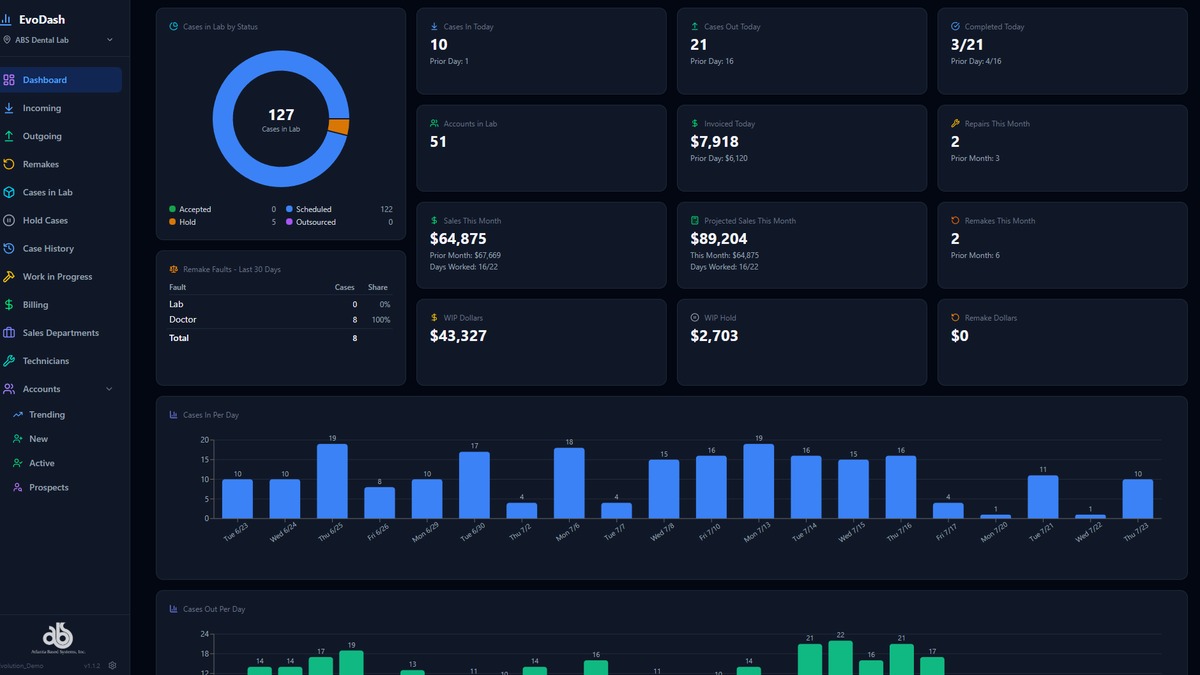
A dashboard is only useful if it answers the question you actually have at 7am on a Tuesday: where do things stand right now? EvoDASH’s new homescreen is built around that question. Case status is a single donut chart — scheduled, on hold, outsourced, accepted — next to a running count of total cases in the lab. Below it, a KPI grid covers what used to take a handful of separate reports to piece together: cases in and out today versus yesterday, what’s been completed, how many accounts are active in the lab, what’s been invoiced, WIP dollars, and sales this month against a live projected-sales figure that adjusts for how many working days are left. You don’t build that report. It’s just there when you open the screen.
Built to show what matters to your lab
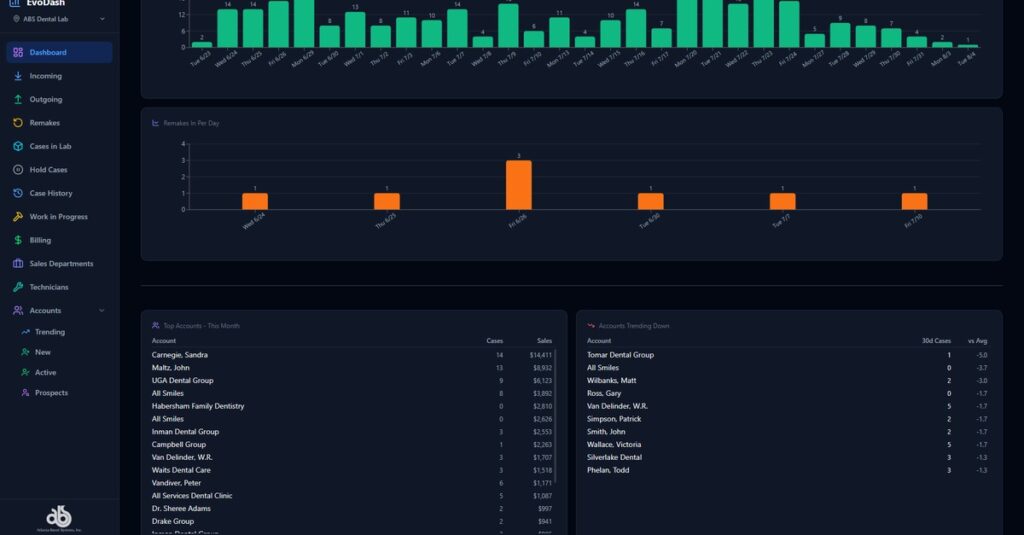
The two screenshots in this post are a sample, not the whole picture. The homescreen is built with a much larger library of widgets than what’s shown here, and which ones show up front and center is customizable lab by lab. A lab focused on collections might lead with billing and AR widgets; a lab focused on production might lead with case flow and technician output. Same homescreen, different priorities on top.
Remake accountability and account health
The part that usually gets missed in a dashboard demo is remake tracking, and it’s built in as its own widget: remake faults over the last 30 days, broken out by whether the fault sat with the lab or with the doctor. That distinction matters more than the raw remake count. A lab running near-zero internal-fault remakes has a very different conversation with a doctor account than one that doesn’t know where its remakes are coming from at all.
Remake fault tracking, top accounts, and accounts trending down — same homescreen.
Next to it, a top accounts this month table and an accounts trending down table sit side by side, so a top account quietly slowing down shows up before it turns into a lost account, not after.
Built into the EvoDASH you already use
None of this requires a separate login or a second system to check. It’s the same EvoDASH your team may already be using — the homescreen is just built to surface the numbers that used to require someone stopping mid-morning to go pull them. Cases in and out per day, remakes in per day, and the full KPI set update as production moves. It’s on track to ship in a build by the end of July.
What this means for your lab
If your Monday production meeting currently starts with someone building a report before the meeting can start, or if you’ve ever found out an account was slowing down only after they’d mostly moved on, that’s exactly the gap this release closes. Worth watching for when it ships.
Ask a lab owner why they are still running software they have clearly outgrown, and the answer is rarely “it works great.” It is usually some version of this: switching feels like a gamble I cannot afford to lose.
That fear is reasonable. A lab runs on its data and its routines. The idea of moving years of doctor accounts, pricing, and case history into a new system, then retraining everyone, is enough to make staying put feel like the safe choice.
But staying on the wrong system has a cost too. It is just quieter. It shows up as workarounds, spreadsheets bolted onto software that cannot do the job, and a ceiling on how much the lab can grow before the tools give out. The risk of switching is loud and obvious. The risk of not switching is slow and easy to ignore.
So the real question is not “should I switch.” It is “how do I switch without the horror story.” Those stories are real, but they almost always trace back to a few avoidable causes.
What actually goes wrong
The data migration is treated as an afterthought. When accounts, pricing, and history are dumped in without a mapping plan, the new system launches full of errors that erode trust on day one. A good migration starts with a deliberate mapping phase, weeks before go-live, so the data lands clean.
Go-live lands on a bad date. Switching in the middle of a heavy production run, or right before month-end, guarantees pain. The fix is simple: pick the date around the lab’s natural rhythm, not the vendor’s calendar.
Training is a video and a hope. Self-serve onboarding works for simple tools. A lab management system touches technicians, managers, AR, order entry, and sales, and each group needs to be shown their part. When training is left to a quickstart link, the system gets blamed for what is really a rollout gap.
Nobody owns the first month-end. Month-end is where a lab either trusts the new system or starts quietly reverting to the old way. Getting through that first close with help is what makes the switch stick.
What a good migration looks like
The pattern is consistent across labs that switch without drama. There is a real implementation plan, not a download. There is a dedicated person who knows the software and walks the lab through setup, configuration, integrations, and training across each role. And that person stays through the first month-end, so the lab is never standing on the new system alone at the moment that matters most.
That is the difference between “here are some docs, good luck” and “we will get you live and we will be there when you close the month.” The first is where horror stories come from. The second is how a switch becomes a non-event.
The honest framing
No migration is zero effort. Anyone who promises that is selling. But the effort is front-loaded and finite, and on the other side is a system that fits the lab you have actually become, instead of the one you were when you first signed up.
The labs that put off the decision for years almost always say the same thing afterward: the switch was smaller than the fear of the switch. The dread did more damage than the move ever did.
If your lab has outgrown its software but the migration is what keeps you stuck, that is worth a conversation. Not a sales pitch, a straight walkthrough of what moving would actually involve for a lab your size, so the decision is based on the real picture instead of the worst-case one.
Most labs do not wake up one day and decide to replace their management software. The realization builds slowly. A workaround here, an export there, one more monthly fee for a feature that used to be simpler. By the time a lab starts shopping, the frustration has usually been quietly compounding for a year or more.
The hard part is telling the difference between normal growing pains and a system that has genuinely stopped keeping up. Here are five signs it is the software, not you.
1. Adding a user costs more than the user is worth
Per-seat subscription pricing feels reasonable when you have five people. At fifteen, it becomes a tax on growth. Every hire is another monthly line item, and the math quietly pushes you to under-license, share logins, or keep people off the system who should be on it. Good lab software should make it easier to grow your team, not more expensive every time you do.
2. Your second location is bolted on, not built in
Plenty of systems can technically handle more than one site. Far fewer were designed for it. The tell is in the daily friction: separate databases you reconcile by hand, reports that cannot combine locations, pricing and AR that do not stay straight across sites. A platform built for multi-location runs every site on one database, shares what should be shared like products and scheduling, and keeps separate what should be separate like price lists and receivables.
3. You cannot see productivity without exporting it
If the only way to know how your technicians are performing is to pull a report after everyone has gone home, you are always managing yesterday. Capacity, efficiency, and case flow should be visible while the day is still happening, in time to actually do something about a bottleneck. When a lab grows past the point where the manager can see the whole floor at a glance, the software has to fill that gap, not widen it.
4. Your CRM only knows what your staff typed in
Most lab CRMs are really just a log of what your team remembered to enter. That leaves out everything your field reps see in the office and everything your doctors do directly. The strongest customer records are fed from all three directions at once: lab staff, field reps, and the doctors themselves, all writing to one shared account history automatically. If your system only captures one of those three, you are seeing a third of the relationship.
5. Your data is not really yours
This is the one labs notice last and regret most. Ask a simple question: if you decided to leave your current software next month, could you take your data with you, cleanly and completely? If the honest answer is “I am not sure,” you do not own your data so much as rent access to it. Owning your database, on your own server and backup drives, is the difference between a vendor relationship and a vendor dependency.
What to do if more than one of these sounds familiar
Recognizing the signs is the easy part. The reason most labs stay on software they have outgrown is not loyalty. It is the fear of switching. Migrating years of cases, accounts, and pricing feels like open-heart surgery on a business that cannot afford downtime.
It does not have to be. The switch is exactly where a software partner earns its keep. At Atlanta Based Systems we assign every new lab a dedicated implementation specialist who handles the migration, trains your team across every role, and stays with you through your first month-end close. We have spent nearly 50 years building Evolution for dental laboratories, and roughly 200 labs across North America run on it today. A good number of them came to us because they had outgrown something else.
If two or three of these signs hit a little close to home, that is worth a conversation. We are glad to show you what your lab looks like on software built to grow with it, no pressure and no obligation.
We have been building toward this for a while. Today, we are proud to announce the official launch of EvoDASH, the real-time lab performance dashboard built directly into the Evolution platform. If you have been following along, you know this has been in beta with a select group of labs. The feedback confirmed what we set out to do. Now it is time to introduce it properly.
WATCH THE EVODASH LAUNCH VIDEO TO SEE IT IN ACTION:
WHAT IS EVODASH?
EvoDASH is a visual dashboard layer built on top of Evolution. It pulls data directly from your Evolution database and presents it as a real-time, read-only control tower view for lab owners and managers. No report-running. No digging through data. Just an at-a-glance picture of your lab. Every dashboard is drill-down capable: click a day, a case number, or an account to get full detail from your Evolution data.
THE EVODASH DASHBOARDS:
Incoming Cases: 30-day view of cases received per day. Click any day to see the full case list. Remakes are flagged with an icon and you can drill into individual case numbers for remake reasons, services, scheduling history, and audit trail.
Outgoing Cases: Cases scheduled to ship each day, broken down by new cases, continuations, remakes, and repairs. See your top outgoing accounts and a 30-day summary of case type percentages.
Case Origin: Shows how each incoming case was submitted: iTero web service, EvoDOCTOR portal, or entered locally in Evolution. Helps identify digital adoption trends across your doctor base.
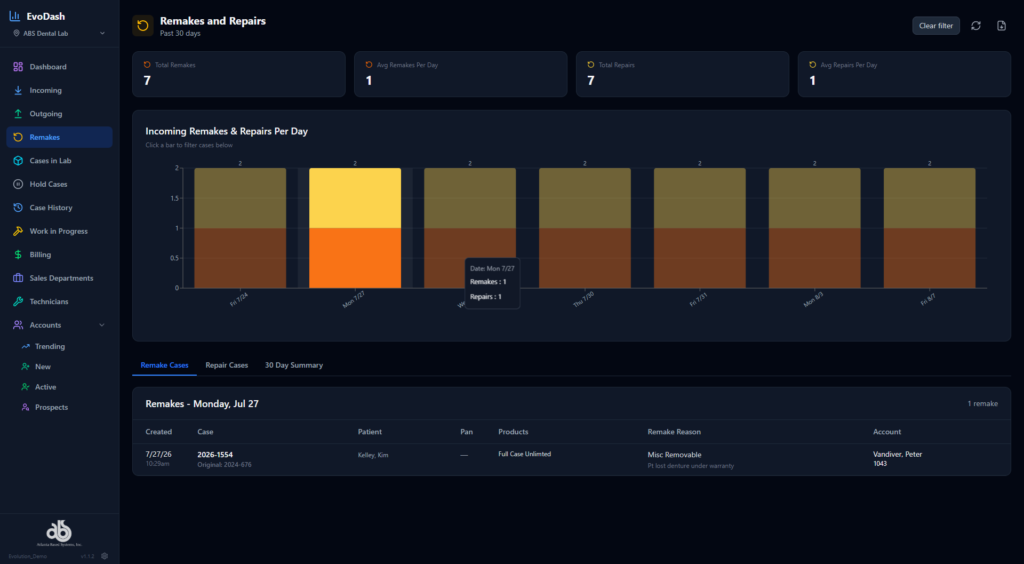
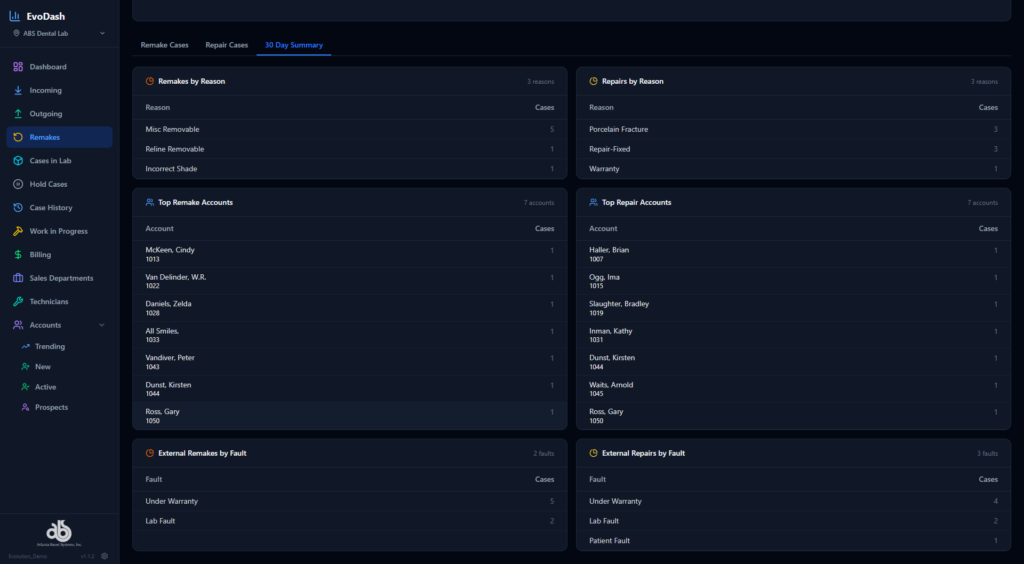
Remakes: Remake cases by day for the current period. The 30-day summary ranks remake reasons by frequency and flags the top accounts generating remake cases.
Cases in Lab: Live list of every case currently in-house, searchable and filterable by account name, case number, or patient name for fast lookup without leaving the dashboard.
Hold Cases: All cases currently on hold with hold reasons displayed. Helps managers quickly identify and clear bottlenecks.
Case History: Case volume going back through your entire Evolution history. Click into any year to see weekly and monthly volume trends over time.
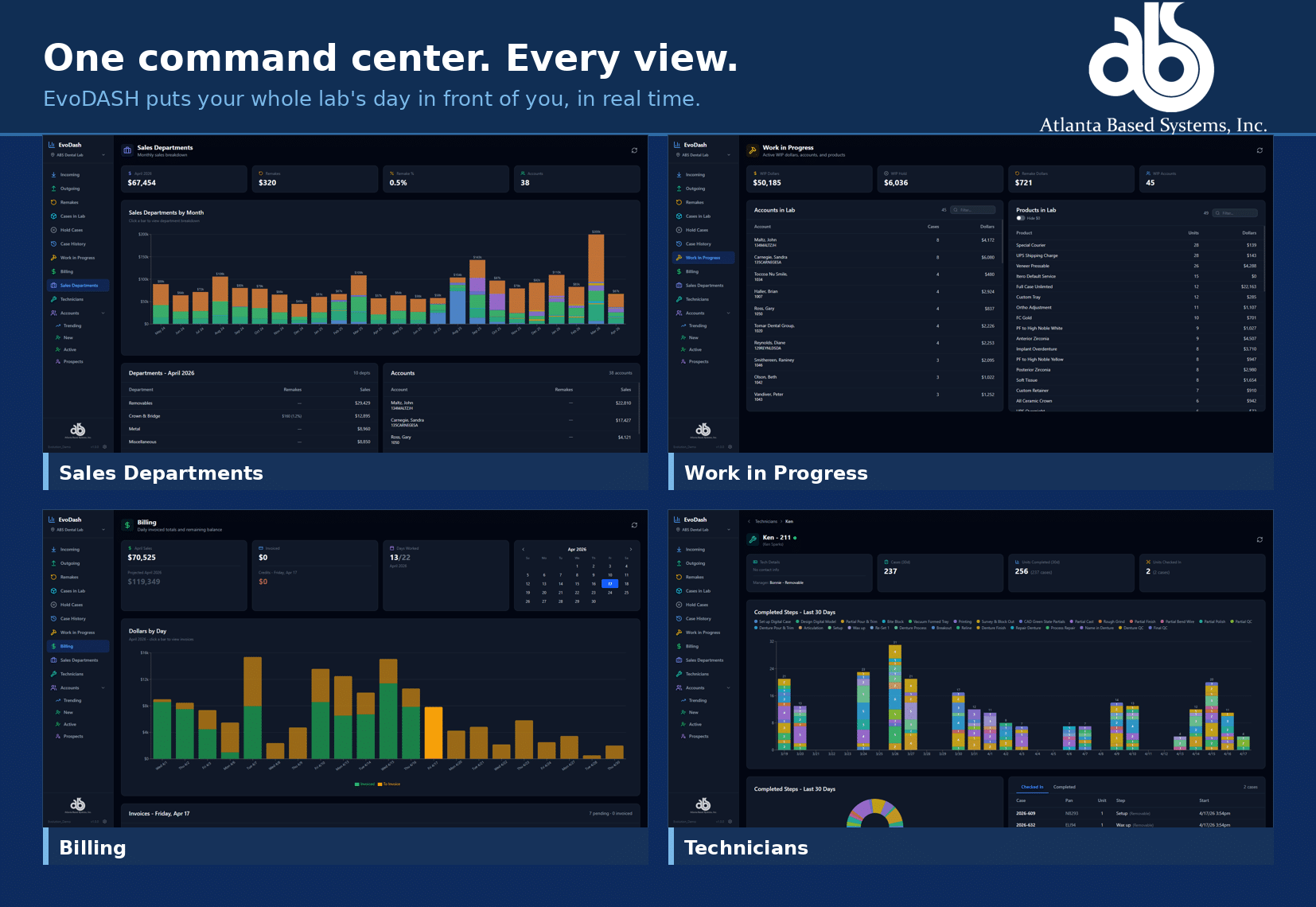
Work in Progress: All active cases organized by doctor account with a dollar value displayed for each. Gives owners a financial snapshot of what is currently on the bench.
Billing: Daily billing view for any period. Green indicators show invoiced cases; outstanding cases are flagged as needing invoicing. Click any day to see exactly which cases still need to be billed.
Sales by Department: Monthly revenue breakdown by lab department (Crown & Bridge, Ortho, etc.). Drill down to see which doctor accounts sent work in each category.
Accounts: Account trending comparing the last 30 days against the prior 90-day baseline. Accounts trend green (up) or orange (down). Filter to view only downtrending accounts, lost accounts, new accounts, or all active accounts.
Technician Productivity: Real-time view of which technicians are clocked in and what cases they currently have checked out. Drill into any technician to see a daily step breakdown, completed case counts, and case-level detail for any date.
WHERE IT MAKES THE BIGGEST DIFFERENCE:
In our conversations with labs during the beta period, two areas benefited most from dashboard visibility: AR and production flow.
On the AR side, labs that review billing daily catch issues earlier. A 45-day balance is a different conversation than a 90-day balance. When the billing view is one screen away instead of buried in a report queue, the calls happen sooner.
On the production side, technician productivity tracking by case type reveals patterns that are invisible in a busy shop. Bottlenecks are easier to see when the data is laid out visually rather than summarized in a weekly export.
One insight that came up repeatedly in beta: tracking cases alone does not give you the full revenue picture. One case can contain a single unit or twenty, and the daily value swings accordingly. EvoDASH tracks both cases and units side by side so you are reading actual production volume, not just case count.
CATCHING THE PROBLEM BEFORE YOU KNOW THERE IS ONE:
When a doctor account goes quiet, how quickly do you find out?
For most labs, the answer is: not quickly enough. A doctor who stops sending cases for two weeks might not appear on anyone’s radar until a monthly statement runs or an AR balance drops far enough to raise a flag. By then, the conversation is harder. The relationship may have already shifted.
EvoDASH’s Accounts dashboard gives lab managers the visibility to spot a declining account while there is still time to act. When daily case volume by account is visible on the dashboard, a two-week gap is noticeable. That is the difference between a proactive call that saves an account and a reactive one that tries to recover it.
Beta lab feedback on this specific point: labs rated the early-warning potential of EvoDASH at 5 out of 5 for daily decision-making impact.
WHAT BETA LABS ARE SAYING:
“I would use this every day.” The response we heard most was that EvoDASH fits naturally into the start-of-day routine. Lab managers described checking cases, units, and revenue figures at the end of each day to close out the shift with a clear picture of where production landed.
“10 out of 10. I would keep using this after beta.” One beta participant rated EvoDASH a 10 out of 10 for ongoing usefulness after their trial period. Another gave it a 5 out of 5 for impact on daily decision-making.
Interface feedback was consistently positive. Beta labs described the dashboard as user-friendly with a clean layout that met their expectations without a steep learning curve.
NOW AVAILABLE – SCHEDULE YOUR DEMO:
EvoDASH is available now for Evolution labs. If you want to see it in action, we are scheduling demos this week. Reach out to Adam Thomas at Atlanta Based Systems to get on the calendar.